This post contains affiliate links. If you buy through them, we may earn a small commission at no extra cost to you.
🕑 18 min read
CRM Software for Small Business — LeadPilot CRM v1.0.0
LeadPilot CRM is practical CRM software for small business owners, sales teams, agencies, consultants, and growing teams. It helps you manage leads, customers, sales opportunities, and follow-ups from one clean and simple dashboard.
🌐 Try the Live Demo
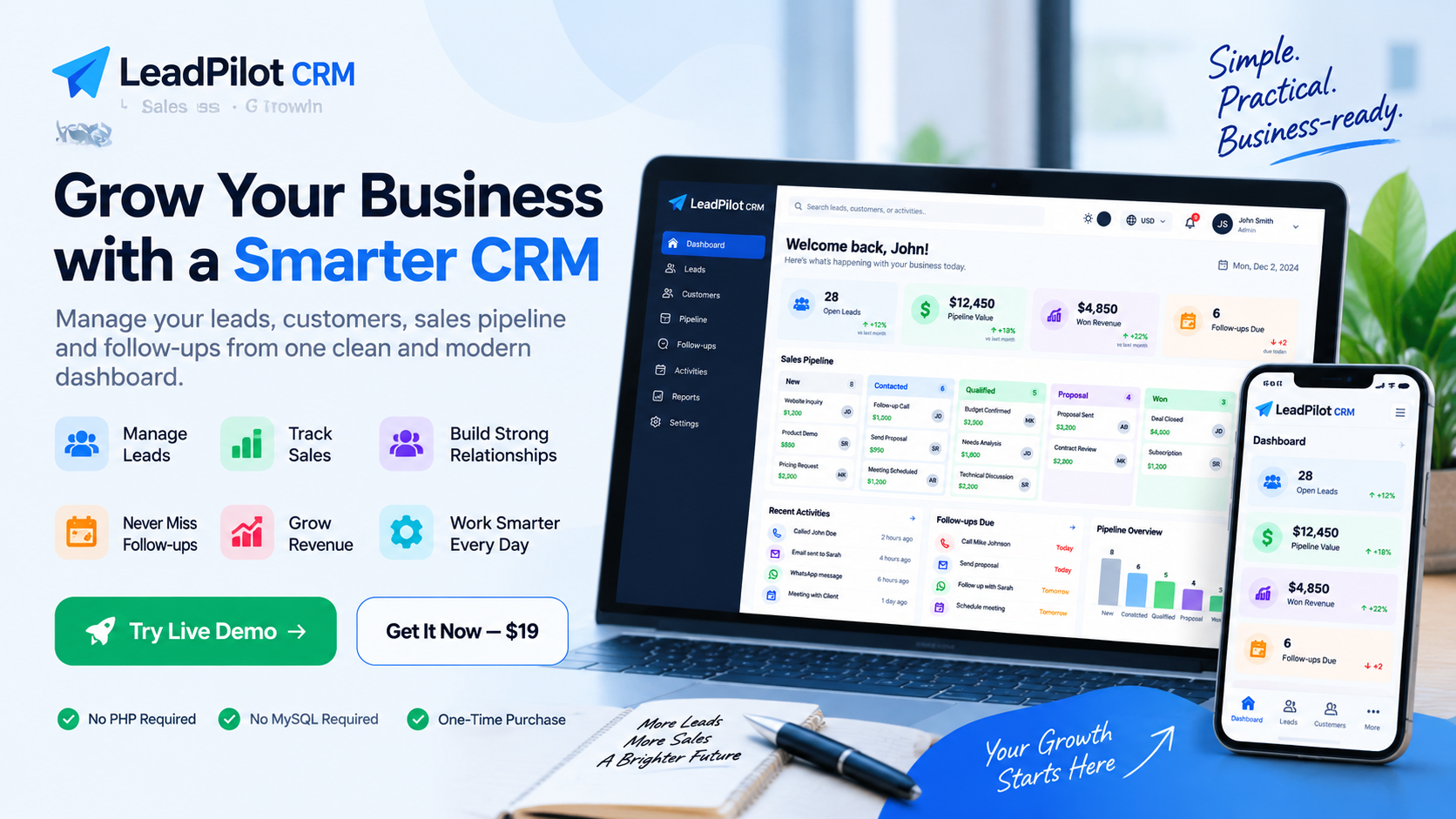
Want to see LeadPilot CRM in action? First, open the live demo. For example, you can explore the dashboard and test the main CRM features directly in your browser.
🚀 Open LeadPilot Live Demo →Also, no installation is needed to view the demo.
📋 What Is LeadPilot CRM?
What This CRM Helps You Manage
First, the CRM brings lead and customer work together. Next, it helps you track sales activity. In addition, follow-up tasks stay easier to review. As a result, daily sales work can be more organized.
LeadPilot CRM is a simple browser-based CRM for small businesses and growing teams. It helps you manage leads, customers, sales activities, and follow-ups in one place.
Also, the system can help agencies, consultants, freelancers, sales teams, service businesses, and startups keep their work organized. For businesses exploring practical CRM software for small business, this approach keeps essential sales information in one place.
Organize Customer and Sales Work
Why Choose a Simple Small Business CRM?
Instead of switching between scattered notes and separate tools, you can organize customer information, sales opportunities, and follow-up tasks in one browser-based workspace. As a result, everyday sales work becomes easier to review and manage.
In addition, you can explore business software from UpComing Solution or test the LeadPilot CRM live demo before purchasing.
Keep Sales Information Organized
Instead of using many files or separate apps, you can keep your customer and sales information inside one dashboard. As a result, important details are easier to find when you need them.
In addition, you can see important sales tasks more clearly and decide what needs attention next. This simple workflow can help reduce the time spent searching for information.
📊 LeadPilot CRM Dashboard
Get a Quick View of Your Sales Work
See Your Daily Sales Overview
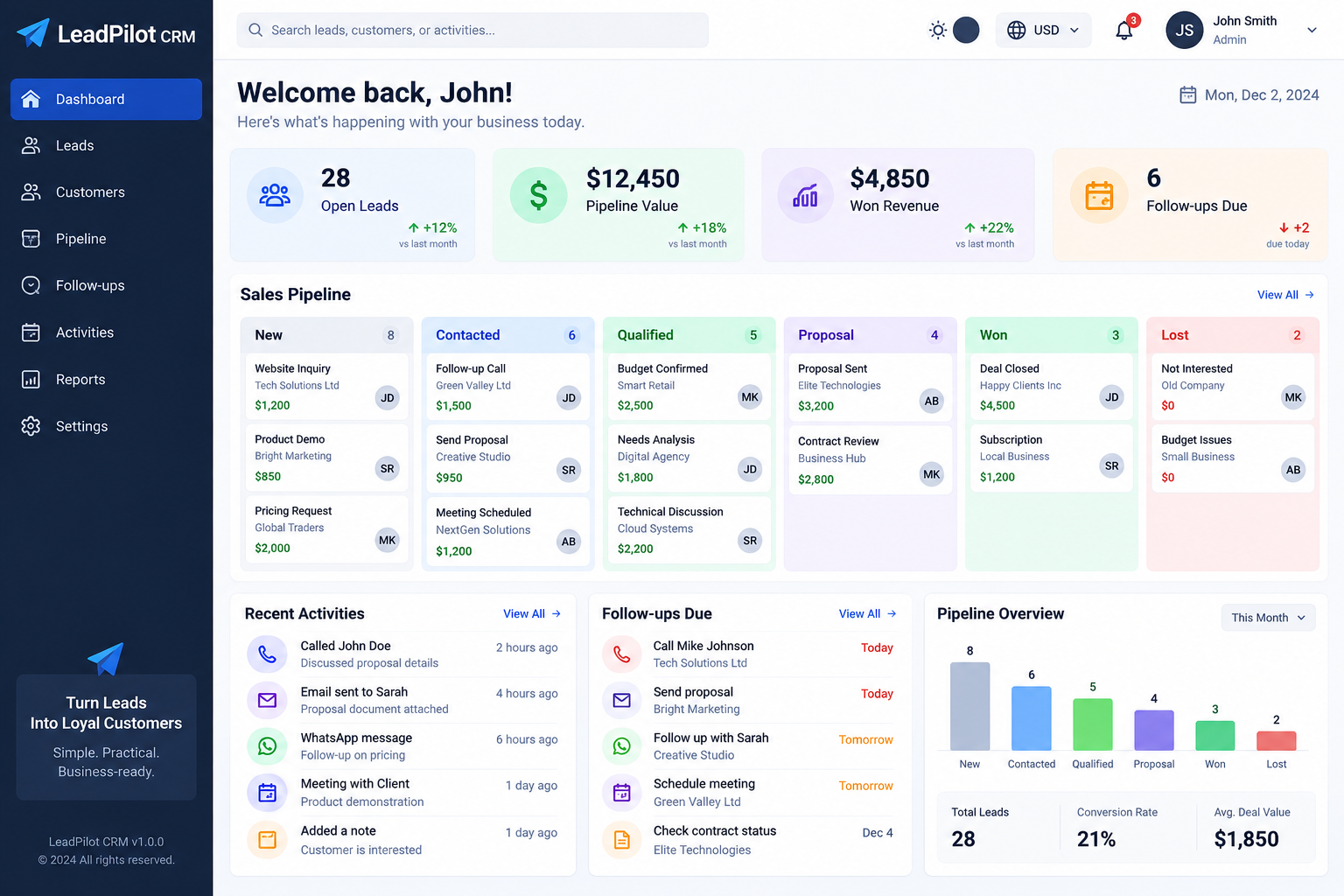
First, the dashboard gives you a quick view of your daily sales work. For example, you can check open leads, pipeline value, won revenue, and follow-up tasks from one screen.
✨ Main CRM Features
Core Tools for Daily Sales Tasks
Tools for Everyday Sales Management
First, the dashboard provides an overview. Next, the pipeline shows deal progress. In addition, lead and customer tools keep records organized. Finally, follow-up and reporting features help you focus on the next sales action.
Moreover, LeadPilot CRM includes useful tools for everyday sales and customer work. Each tool has a clear purpose. As a result, As a result, you can manage your sales process with less confusion. Moreover, the tools work together around common sales tasks. For general CRM background and terminology, you can also review the CRM overview from Salesforce .
Core Tools for Daily Sales Work
First, the dashboard gives you a quick overview. Next, the sales pipeline helps you follow deal stages. Meanwhile, lead and customer management keeps important details organized. Finally, follow-up tools and reports help you stay focused on the next action.
Executive Dashboard
First, get a quick view of your sales activity from the main dashboard. This overview helps you see what needs attention.
- Open leads
- Pipeline value
- Won revenue
- Follow-up tracking
- Pipeline snapshot
Sales Pipeline
Next, track each deal as it moves through your sales process. In this way, you can see the current stage of each opportunity.
- New
- Contacted
- Qualified
- Proposal
- Won
- Lost
Lead Management
Next, keep your leads organized and add useful details to each sales opportunity. Therefore, important lead information stays easier to review.
- Lead capture
- Lead qualification
- Deal value tracking
- Lead sources
- Priority management
Customer Management
In addition, keep customer details in one place. As a result, important contact information is easier to find later.
- Customer profiles
- Contact information
- Customer activity
Follow-up Management
Next, plan your next customer contact and keep important tasks on track. In addition, due dates help you stay focused on upcoming work.
- Follow-up tasks
- Priority tracking
- Due dates
Activity Timeline
Meanwhile, record customer activities and keep a simple history of your communication. For example, you can record calls, emails, meetings, WhatsApp activity, and notes.
- Calls
- Emails
- Meetings
- Notes
Reports
In addition, review your sales data and get a clearer view of business activity. Therefore, you can spot important sales information more easily.
- Conversion reports
- Revenue reports
- Pipeline overview
- Business performance
Currency Support
Finally, choose a common currency when you manage your business values. Currently, the available options are USD, CAD, and EUR.
- USD
- CAD
- EUR
📱 Responsive Design
Work Across Your Devices
Moreover, LeadPilot CRM works on different screen sizes. Therefore, you can use it on a desktop, laptop, tablet, or mobile device. This flexibility is useful when you work from different places.
- 🖥️ Desktop
- 💻 Laptop
- 📱 Tablet
- 📲 Mobile
🌙 Dark Mode
A More Comfortable View
In addition, the interface includes dark-mode support. As a result, you can switch to a darker interface when you prefer a low-light view. This option can also make the interface more comfortable in darker surroundings.
💾 Local Data Storage
How Your Local Data Works
Currently, this version uses browser LocalStorage to save data locally. Therefore, you do not need a database server for the current version.
However, local data does not automatically sync between devices. For this reason, regular backups are recommended. In addition, keeping a recent backup can make recovery easier.
🎯 Who Is LeadPilot CRM For?
Who Can Benefit From It?
Businesses and Teams That Can Use It
LeadPilot CRM is suitable for people and businesses that want an easy way to manage leads, customers, and sales work. It can suit teams that want a straightforward browser-based workflow.
🏪 Small Businesses
Manage customer details, leads, sales opportunities, and follow-up tasks from one dashboard.
📞 Sales Teams
Track prospects and see which stage each sales opportunity has reached.
📣 Agencies
Keep client information, activities, and new business opportunities organized.
💼 Consultants & Freelancers
Manage customer information and follow-ups without depending on scattered notes.
🛠️ Service Businesses
Track customer requests, sales opportunities, and important activities with less manual work.
🚀 Startups
Build a simple lead management process as your business grows.
👥 About LeadPilot CRM
A Simple Approach to CRM
LeadPilot CRM focuses on simple tools for real business needs. Our goal is to make lead, customer, and sales management easier for small businesses and growing teams. In addition, the product keeps the main sales tasks together in one place.
That approach keeps the main sales tools together. As a result, users can spend less time searching for information and more time working with customers.

🚀 Easy to Use
Simple Setup
Fortunately, getting started with LeadPilot CRM is simple. For the current version, no traditional server setup is needed.
In fact, you do not need PHP or MySQL to run the current browser-based version.
- ✅ No PHP required
- ✅ No MySQL required
- ✅ No hosting required for the current version
- ✅ Browser-based
- ✅ Easy local setup
First, download the package, extract the ZIP file, and open index.html in a modern web browser.
📦 What You Get
Included in Your Purchase
First, your purchase includes the complete LeadPilot CRM package. In addition, you receive the following resources:
- 🚀 LeadPilot CRM v1.0.0
- 📄 index.html
- 📖 README.md
- 🔐 LICENSE.txt
- 📘 CUSTOMER-GUIDE.txt
- 🖼️ Dashboard screenshot
- 📜 Commercial License
❓ Frequently Asked Questions About CRM Software for Small Business
Common Questions Before Purchase
Quick Answers Before You Buy
Before you buy, you may have questions about LeadPilot CRM. Below, the answers explain the main points in simple terms. Therefore, you can review the key product details before purchasing.

What is LeadPilot CRM?
LeadPilot CRM is a browser-based CRM that helps you manage leads, customers, sales opportunities, and follow-ups from one dashboard.
Who can use LeadPilot CRM?
For example, small businesses, sales teams, agencies, consultants, freelancers, service businesses, and startups can use the current version.
Do I need PHP or MySQL?
No. In fact, the current browser-based version does not require PHP, MySQL, or a traditional server.
Where is my data stored?
Instead, your data is stored in browser LocalStorage on the device where you use the software.
Does the data sync between devices?
No. The current version does not automatically sync data between different devices. Therefore, regular backups are recommended.
Can I try the CRM before buying?
Yes. Before purchasing, you can open the live demo and explore the main features.
What currencies are supported?
Currently, the available currencies are USD, CAD, and EUR.
How much does LeadPilot CRM cost?
Finally, LeadPilot CRM v1.0.0 is available for a one-time purchase of $19.
Important Information Before You Use LeadPilot CRM
Before getting started, keep the local-first design in mind. In particular, the current version stores data in your browser rather than in a cloud database.
LeadPilot CRM v1.0.0 is a browser-based, local-first application. Therefore, its current data model is designed around local browser storage.
Importantly, your data stays in the browser on the device where you use the software. For that reason, regular backups are important.
However, it does not automatically sync data between different devices. Consequently, regular backups are recommended.
The current version is not a cloud SaaS application. PHP, MySQL, and a server are not required.
🔐 Commercial License
License Basics
In addition, a commercial license is included with your purchase. You can use LeadPilot CRM for your own business according to the included license terms. However, always review the included license before using the product commercially.
However, you may not redistribute, resell, or repackage the original software unless you have written authorization.
Before using the product, please read LICENSE.txt for the complete license terms.
💬 Support
Get Product Help
If you need help with the product, You can contact UpComing Solution for product support, customization, and business software solutions. In addition, you can try the live demo before making a purchase if you are comparing your options.
🌐 Visit UpComing Solution →💵 One-Time Purchase — $19
Get LeadPilot CRM v1.0.0 and manage leads, customers, sales opportunities, and follow-ups from one simple dashboard.
Not sure yet? That’s okay. First, try the live demo and explore the main features before purchasing.
🚀 Try Live Demo First →Therefore, explore the demo before purchasing the complete package.
Simple. Practical. Business-ready.
Organize your leads, customers, sales pipeline, and follow-ups with LeadPilot CRM.
🌐 Open Live Demo →1. You Are Losing Leads Because Follow-Ups Are Being Missed
One of the biggest reasons businesses lose potential customers is not necessarily poor products or expensive prices. Sometimes the problem is simply that nobody followed up at the right time.
Imagine a potential customer contacts your business and asks about your service. You answer the question but become busy with another task. Two days later you remember the customer, but by then the customer may already have contacted another company.
This happens frequently when businesses depend on memory or manual notes.
⚡ How CRM Software for Small Business Can Help
- Record every new lead.
- Set follow-up reminders.
- Assign leads to team members.
- Record previous conversations.
- Track the next action.
- Identify leads that have not been contacted.
With CRM software for small business, your sales process can become more structured. Instead of asking, “Who should I call today?”, your CRM can show you which customers require attention.
A lead that receives the right follow-up at the right time has a better chance of becoming a customer than a lead that is forgotten.

2. Your Customer Information Is Scattered Everywhere
Another common problem is fragmented customer information. One customer’s phone number may be stored in a mobile phone. Another customer’s quotation may be inside an email. A third customer’s information may be written on paper.
When customer data is scattered, your team may spend valuable time searching for information instead of serving customers.
📂 Common Places Where Customer Information Gets Lost
Mobile Phones
Important customer information may remain on individual employees’ phones.
Old conversations and quotations can become difficult to locate.
Notebooks
Handwritten notes are easy to lose and difficult to share with a team.
Spreadsheets
Spreadsheets can work initially but become difficult to manage as the customer base grows.
A CRM brings important information into a centralized system. This makes it easier for authorized team members to understand customer history and continue conversations without starting from zero.
3. You Cannot Clearly See Where Your Sales Are Coming From
If you have many leads but do not know which stage they are in, your sales process can become difficult to manage.
For example, you may have 100 potential customers. But how many are new leads? How many have received a quotation? How many are negotiating? How many are ready to buy?
Without a structured system, these questions can be difficult to answer.
📈 A CRM Sales Pipeline Provides a Simple Overview
| Stage | What It Means | Next Action |
|---|---|---|
| New Lead | A new potential customer has contacted you. | Contact the lead. |
| Contacted | The first conversation has taken place. | Understand requirements. |
| Qualified | The customer appears genuinely interested. | Prepare offer or quotation. |
| Proposal | A proposal or quotation has been sent. | Follow up. |
| Negotiation | The customer is discussing terms. | Answer questions and objections. |
| Won | The customer has purchased. | Deliver and maintain relationship. |
| Lost | The opportunity did not convert. | Record reason and learn from it. |
This pipeline view can help business owners understand what is happening inside the sales process instead of relying entirely on assumptions.
4. Your Team Is Spending Too Much Time on Manual Work
Small businesses need to use their time carefully. When employees spend hours copying customer information, checking spreadsheets, sending repetitive follow-up messages, and creating manual reports, less time remains for productive sales and customer service.
Depending on the CRM platform, some repetitive activities can be simplified or automated. Examples may include task reminders, lead assignments, notifications, email workflows, customer segmentation, reporting, and follow-up scheduling.
⚙️ Automation Does Not Replace Your Team
Instead, good automation can reduce repetitive administrative work and allow people to spend more time on activities that require human communication, judgment, creativity, and relationship building.

5. Your Business Is Growing and Your Current System Cannot Keep Up
A manual system may work when your business has only a few customers. But as the number of leads, customers, employees, products, and sales opportunities increases, the same system can become difficult to maintain.
Growth creates more data. More data creates more complexity. More complexity increases the chance of mistakes.
This is one of the strongest reasons to consider CRM software for small business before customer management becomes chaotic.
🚨 Signs That Your Business May Be Ready for a CRM
- You are receiving more leads than before.
- You sometimes forget to follow up with customers.
- Multiple employees communicate with the same customers.
- Customer information is stored in several places.
- You cannot easily see your sales pipeline.
- You spend too much time creating manual reports.
- You want to improve customer retention.
- You need a better way to measure sales performance.
Major Benefits of CRM Software for Small Business
The exact features of CRM platforms vary, but the overall objective is to improve the way a business manages customer relationships.
Lead Tracking
Track leads from the first inquiry through qualification, proposal, negotiation and conversion.
Contact Management
Store customer contact information and important notes in one organized location.
Follow-Up Reminders
Create tasks and reminders so important opportunities do not disappear.
Sales Reports
Understand sales activity and identify areas where your team can improve.
Team Collaboration
Allow team members to work from the same customer information instead of isolated files.
Process Automation
Reduce repetitive administrative work where appropriate.
CRM vs Spreadsheet: Which Is Better?
Spreadsheets are useful and inexpensive. For a very small operation, a spreadsheet may be enough to store basic contact information. However, CRM platforms are designed specifically around customer relationships and sales workflows.
| Feature | Spreadsheet | CRM |
|---|---|---|
| Contact storage | ✓ | ✓ |
| Lead pipeline | Manual | ✓ |
| Follow-up reminders | Limited | ✓ |
| Team collaboration | Basic | ✓ |
| Customer history | Manual | ✓ |
| Automation | Limited | ✓ |
| Sales reporting | Manual | ✓ |
How to Choose CRM Software for Small Business
Choosing a CRM should not be based only on how many features a platform offers. The best system is the one your team can actually use consistently.
1. Look for a Simple Interface
If the software is unnecessarily complicated, employees may avoid using it. Choose a system with clear navigation and an easy-to-understand dashboard.
2. Check Lead Management Features
Lead capture, lead assignment, pipeline management and follow-up tools are particularly important for sales-focused businesses.
3. Consider Reporting
Good reporting can help you understand sales performance, lead sources, conversion rates, and team activity.
4. Think About Future Growth
Your CRM should ideally be capable of supporting your business as the number of customers and employees increases.
5. Check Integrations
Depending on your workflow, you may want integration with email, calendars, forms, communication platforms, accounting systems, websites, or other business applications.
How to Start Using a CRM Without Complicating Your Business
You do not need to move every business process into a CRM on the first day. A gradual approach can be easier for a small team.
Step 1 — Collect Your Leads
Bring existing customer and lead information into one organized database.
Step 2 — Define Sales Stages
Create simple stages such as New Lead, Contacted, Qualified, Proposal, Won and Lost.
Step 3 — Create Follow-Up Rules
Decide when and how leads should be contacted after their initial inquiry.
Step 4 — Train Your Team
Make sure everyone understands how to add information and update lead status.
Common CRM Mistakes Small Businesses Should Avoid
❌ Buying a CRM and Not Using It
A CRM only becomes valuable when customer information is regularly updated.
❌ Adding Too Many Complicated Stages
Start with a simple sales pipeline. Add complexity only when your team actually needs it.
❌ Ignoring Data Quality
Duplicate or incorrect customer information can make any CRM difficult to use.
❌ Forgetting Follow-Up
A CRM does not automatically create relationships. Your team still needs to communicate with customers.
🔗 More Business Management Guides
If you are interested in improving other parts of your business, read these related guides from UpComing Solution:
Useful External Resources
Learning about customer relationship management from established business and technology resources can also help you understand how CRM fits into a broader business strategy.
Ready to Stop Losing Leads?
A better customer management process can help your business stay organized, respond faster, and build stronger customer relationships.
Start by identifying where your current sales process is losing opportunities. Then choose the tools and workflow that fit your business.
Explore the CRM before purchasing.
Frequently Asked Questions About CRM Software for Small Business
❓ What is CRM software?
CRM software is a system used to organize customer information, leads, sales activities, follow-ups and customer relationships.
❓ Does a small business really need a CRM?
Not every small business needs the same tools. However, if you regularly manage leads, customers, follow-ups or a sales pipeline, a CRM can make those activities more organized.
❓ Can CRM software help prevent lost leads?
Yes. Lead tracking, reminders, assigned tasks and pipeline management can help reduce the chance of important opportunities being forgotten.
❓ Is CRM better than Excel?
Excel can be useful for simple lists and basic data management. A CRM is specifically designed for customer relationships, sales pipelines, activities and follow-ups, so it can become more useful as a sales operation grows.
❓ Is CRM software expensive?
CRM pricing varies widely. Some platforms offer free plans or trials, while others charge based on users and features. Businesses should compare pricing with the actual value and workflow requirements.
❓ What information should I store in a CRM?
Depending on your business, useful information may include customer name, contact details, company, lead source, conversation notes, sales stage, tasks, follow-up dates and purchase history.
❓ Can CRM software improve customer service?
A well-maintained CRM can give team members access to relevant customer history, which can make communication more consistent and informed.
Final Thoughts
Losing leads can be frustrating, especially when you know that some of those leads could have become valuable customers. In many cases, the problem is not a lack of potential customers. The problem is the process used to manage them.
When leads are stored in different places, follow-ups depend on memory, and sales activities are tracked manually, opportunities can easily fall through the cracks.
CRM software for small business provides a structured way to organize customer information, manage leads, schedule follow-ups, understand the sales pipeline, and improve team collaboration.
The goal is not to add unnecessary technology to your business. The goal is to create a simple and reliable process that helps your team spend less time searching for information and more time building customer relationships.
A CRM is a tool. The real value comes from combining the tool with a clear sales process, consistent follow-up, accurate customer data, and excellent customer service.