This post contains affiliate links. If you buy through them, we may earn a small commission at no extra cost to you.
🕑 14 min read
Organizing a successful gathering, whether it is an intimate high-society wedding, an expansive corporate conference, or a multi-day community festival, is a highly complex undertaking. The modern coordinator must juggle communication channels, monitor budgets, coordinate vendor arrivals, and maintain an accurate, up-to-the-minute guest register. Historically, professionals relied on fragmented systems: paper checklists, bloated Excel spreadsheets, and disjointed email threads. In today’s fast-paced digital ecosystem, these outdated workflows lead directly to miscommunication, double bookings, and catastrophic administrative oversights.
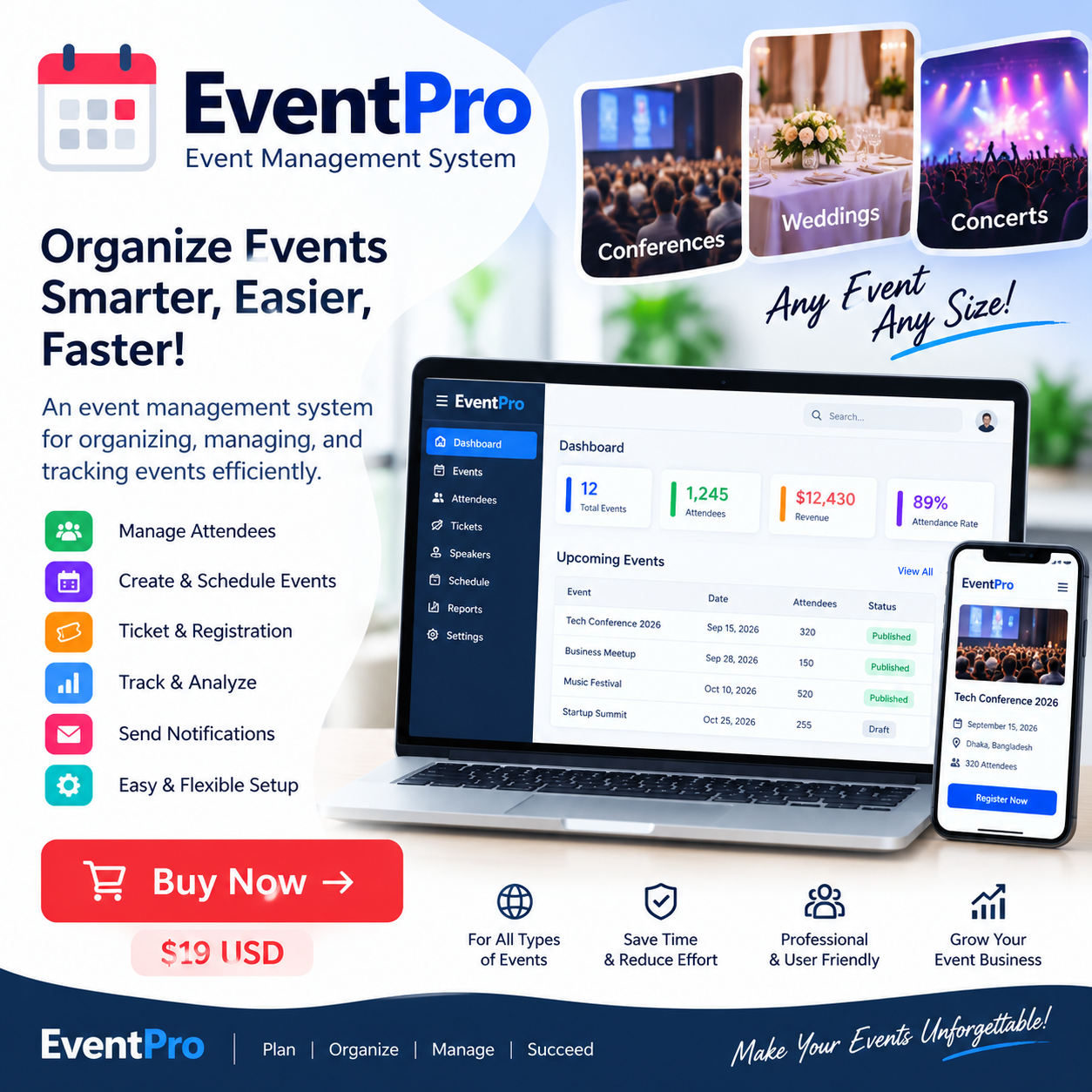
To overcome these planning challenges, professional coordinators are turning to integrated digital systems. A centralized workspace can turn organizational chaos into structured efficiency. The EventPro — Event Management System is designed to address these pain points. Developed as an all-in-one hub for administrative tasks, this platform bridges the gap between organizers, invitees, and third-party service providers. By centralizing operations under one digital roof, it ensures that no detail is missed, budgets remain balanced, and timelines are followed with precision.
In this in-depth guide, we will analyze this modern event utility. We will explore its key features, discuss who stands to benefit most from its tools, examine its pros and cons, and see how it compares to traditional manual planning. By the end of this review, you will understand how this software can elevate your administrative standards and help you deliver memorable, stress-free gatherings every single time.
Experience the EventPro Demo LiveWhat is the EventPro — Event Management System?
At its core, the EventPro — Event Management System is a cloud-accessible, responsive software platform designed to manage the entire lifecycle of an event. Rather than forcing users to navigate multiple applications for invitations, vendor contacts, and task checklists, the system brings all of these features into a single, cohesive interface. This centralized architecture allows organizers to transition smoothly from the initial brainstorming phase straight through to post-event reporting.
The platform is built on modern web technologies to ensure speed, security, and cross-device compatibility. Whether you are accessing the dashboard from a desktop computer at your office or reviewing guest arrivals on a mobile tablet at the venue, the system adjusts to fit your screen. This flexibility is essential for dynamic coordinators who are constantly on the move, moving between supplier warehouses, client meetings, and the venue floor. You can see how the platform looks and behaves by visiting the interactive EventPro Demo online.
This software is not just a digital address book; it is an active planning partner. It structures the chaotic elements of event logistics into manageable, trackable components. By giving you real-time visibility into RSVP status, vendor agreements, and critical preparation tasks, the platform minimizes the risks of administrative errors. This ensures your events run smoothly, protecting your professional reputation and saving your team valuable hours of manual work.
Comprehensive Features and Deep-Dive Functionality
A high-quality software suite is defined by its features. The platform offers a rich set of tools tailored specifically to the real-world demands of busy coordinators. Below, we break down these core tools to show how they translate into daily operational success.
Intelligent Guest and RSVP Administration
Managing the guest list is often one of the most stressful parts of organizing any gathering. Dealing with dietary restrictions, seating arrangements, fluctuating headcounts, and late RSVPs can quickly become overwhelming. This system simplifies this process with an automated, highly interactive guest management system. Organizers can import invitee lists, group contacts by categories (such as VIPs, corporate sponsors, or family members), and track RSVP statuses in real-time.
As responses come in, the central dashboard updates immediately. This gives you an accurate, real-time look at your current headcount. This instant visibility is incredibly helpful when placing final catering orders, arranging seating charts, or purchasing promotional merchandise. Additionally, you can utilize external artificial intelligence platforms to draft customized, persuasive invitation emails. For inspiration on writing great prompts for these invites, explore our comprehensive ChatGPT A–Z Master Guide.
Vendor and Supplier Coordination Hub
An event is only as good as its supporting vendors. From gourmet caterers and florists to audio-visual technicians and entertainers, managing multiple independent contractors requires organized tracking. The system features a built-in Vendor Directory designed to keep all contractor details organized. You can store contact information, save active service contracts, note payment schedules, and assign specific delivery timelines to each partner.
By keeping this data in one shared location, you eliminate the need to search through old emails to find a vendor’s phone number or check when a deposit is due. The platform serves as a single source of truth, keeping your suppliers accountable and helping your team run operations smoothly on the day of the event. If your planning business manages inventory or physical items for these vendors, integrating a dedicated StockFlow Inventory Management System v1.0.0 can help you track those assets alongside your vendor lists.
Dynamic Event Creation and Scheduling
The foundation of the platform lies in its ability to manage multiple events at once. Users can set up distinct project pages for different bookings, each with its own dates, venues, agendas, and target attendee counts. This multi-tenant feel is perfect for agencies that manage several projects at the same time. It allows you to switch between a corporate conference, a private wedding, and a local charity run with just a few clicks.
Within each project dashboard, you can build detailed agendas down to the minute. This ensures that speakers, caterers, and technical crews know exactly when they need to be on stage or setting up. This structured timeline helps prevent scheduling conflicts and ensures your program flows naturally from one segment to the next.
Task Assignment and Collaborative Workflows
Successful execution requires great teamwork. The platform includes task management features that let you break down large projects into smaller, actionable items. You can set deadlines, assign tasks to specific team members, and monitor progress over time. This reduces the need for constant status meetings, as everyone can see what tasks are pending, in-progress, or completed right from the dashboard.
By defining clear responsibilities, you prevent tasks from slipping through the cracks. It also helps you identify bottlenecks early. For example, if a team member is falling behind on venue decorations, you can easily reassign tasks or adjust deadlines before it impacts the event. This collaborative focus aligns with modern project management standards, like those taught by the Project Management Institute, ensuring your team works efficiently and stays on the same page.
Explore EventPro Features and DemosWho is the EventPro — Event Management System Designed For?
This software is built to be highly versatile, making it an excellent fit for a wide variety of users. By offering an intuitive interface and scalable features, it meets the needs of both professional coordinators and casual planners alike.
- Professional Event Agencies: Agencies managing multiple large-scale client bookings need a tool that can handle complex logistics without slowing them down. The ability to switch between projects, manage vendor lists, and track guest lists makes it an essential daily workspace for busy agency teams.
- Corporate HR and Internal Planners: Many companies organize their own internal events, such as annual shareholder meetings, holiday parties, and team-building retreats. For these internal coordinators, the platform acts as a reliable, secure CRM Software for Small Business tool, making it easy to track employee participation and coordinate with external vendors.
- Wedding and Social Event Coordinators: Social gatherings have unique, fast-changing requirements. A wedding coordinator must manage seating arrangements, track dietary preferences, and coordinate florists, decorators, and musicians. The platform’s organized dashboards keep these details structured, allowing planners to focus on delivering a magical experience for the hosts and guests.
- Non-Profit Organizations and Community Leaders: Non-profits often operate with small teams and limited budgets, yet they organize highly important events like charity galas, fundraisers, and volunteer rallies. This system provides the structure they need to manage attendee outreach and vendor logistics efficiently, helping them maximize their impact with minimal administrative overhead.
- Independent Venue Owners: Managers of banquet halls, conference centers, and community hubs can use this system to coordinate with incoming guests and external vendors. This ensures that their space is used efficiently, setup times are respected, and events run smoothly without scheduling conflicts.
For independent venue owners and planners who also sell tickets or event merchandise on-site, having a reliable sales solution is key. Combining this platform with a dedicated POS Management Software for Small Business in Bangladesh creates a seamless setup, allowing you to manage check-ins and process payments within the same operational flow.
Pros and Cons of the Platform
Every software solution has its unique strengths and potential drawbacks. To help you make an informed decision, we have put together an honest, balanced analysis of the pros and cons of using this system.
The Advantages (Pros)
- Centralized Hub: Having your guest lists, RSVPs, vendor directories, and task checklists in one place saves you from constantly switching between different applications. This keeps your data organized and reduces the risk of administrative errors.
- User-Friendly Design: The platform features a clean, modern interface that is easy to navigate. This makes it simple to onboard new team members or clients, even if they aren’t highly tech-savvy.
- Real-Time Updates: With cloud-synchronized data, your team always has access to the latest guest counts and vendor schedules. This real-time visibility is invaluable during high-pressure planning periods.
- Mobile-Responsive Layout: The system is fully optimized for mobile devices. This allows coordinators to update guest check-ins, lookup vendor contact details, and check off completed tasks directly from their phone or tablet while on the venue floor.
- Improved Accuracy: By replacing paper checklists with digital tracking, you minimize the risk of lost notes, forgotten tasks, and double-booked vendors. This helps protect your brand’s professional reputation.
The Considerations (Cons)
- Learning Curve for Advanced Setups: While the basic interface is very intuitive, setting up large, highly complex events with hundreds of vendors may require some initial configuration and onboarding time.
- Dependence on Internet Connectivity: As a modern cloud-based application, the platform requires an active internet connection to sync real-time updates across multiple devices.
- No Native Financial Accounting: While the system is excellent for organizing logistics, it is not built to handle complex corporate accounting, invoicing, or payroll. To manage client billing and vendor payments, you will want to pair it with dedicated Invoice Software for Small Business.
How It Compares to Manual Planning and Alternatives
To truly understand the value of this system, it is helpful to compare it to the traditional planning methods that many coordinators still use today. Historically, events have been managed using manual spreadsheets, paper planners, and disjointed email threads.
| Operational Metric | Manual Planning (Spreadsheets) | EventPro — Event Management System |
|---|---|---|
| RSVP & Guest Updates | Slow and manual. Requires copy-pasting RSVP data from emails and messages. | Automated and instantaneous. The central register updates the moment a response is logged. |
| Team Collaboration | Difficult. Multiple spreadsheet versions lead to confusion and lost updates. | Centralized. All team members view and edit the same real-time dashboard. |
| Vendor Management | Disjointed. Vendor contact details, contracts, and schedules are scattered across different folders. | Integrated. A single directory stores all supplier details, contracts, and timelines. |
| Mobile Access | Frustrating. Standard spreadsheets are difficult to read and update on mobile screens. | Seamless. A responsive design optimized for smartphones and tablets. |
| Task Accountability | Vague. It’s easy for small tasks to slip through the cracks without assigned owners. | Clear. Tasks feature clear due dates, progress statuses, and assigned team members. |
When compared to basic office spreadsheets, the advantages of a dedicated management system are clear. Spreadsheets are static and prone to human error, whereas an integrated system is dynamic, interactive, and built specifically for event workflows. It reduces the time spent on manual data entry, allowing your team to focus on the creative and strategic parts of your events.
Additionally, while enterprise project management tools can be adapted for event planning, they often lack specific features like RSVP tracking and vendor directories. This forces planners to purchase extra add-ons, increasing costs and complexity. This platform offers a tailored, cost-effective solution with all the essential features built-in from the start.
For organizations looking to build long-term relationships with their guests, this platform serves as an excellent foundation. For more tips on using software to build customer loyalty, check out our guide on the benefits of a modern POS System for Retail Shop.
Pricing and System Implementation
Choosing the right software requires balancing its features with your budget. Because pricing for event management tools can vary depending on your team size, event frequency, and specific hosting needs, we recommend visiting the official EventPro Demo page for the most accurate, up-to-date pricing plans.
When evaluating the cost, it is helpful to look at the return on investment (ROI). Think about how many hours your team spends on manual data entry, chasing RSVPs, and searching for vendor contacts. By automating these tasks, this software can save your team dozens of hours per project. This time savings translates directly into lower administrative costs, less staff burnout, and the ability to take on more bookings throughout the year.
Additionally, preventing a single major mistake—such as a double-booked vendor or a forgotten dietary restriction—can save you from costly venue fees, refunds, and damage to your professional reputation. In this light, a reliable management tool is not just an expense; it is an investment in your business’s growth and peace of mind.
Try the Live Demo of EventPro TodayIf your planning business also handles direct client bookings, pairing this platform with a dedicated scheduling system is highly beneficial. Take a look at our guide on Appointment Booking Software to see how a streamlined booking process can help you win clients before the planning process even begins.
To learn more about the industry standards for event planning, you can read the comprehensive overview of Event Management on Wikipedia. This provides historical context and professional guidelines for organizers worldwide.
Frequently Asked Questions
Can I manage multiple events at the same time with this system?
Yes. The system is built with a multi-project dashboard that lets you create, track, and manage several events at once. You can easily switch between different event portals, keeping guest lists, tasks, and vendor directories completely separate.
Is the EventPro platform mobile-friendly?
Absolutely. The software features a fully responsive design. Whether you are using a desktop computer at the office, a tablet during a walkthrough, or a smartphone on-site, the interface adjusts to your screen for easy reading and editing.
Does the software include RSVP tracking?
Yes. The system features built-in RSVP and guest management tools. This allows you to track responses in real-time, organize guests by category, and maintain an accurate, up-to-the-minute headcount for your caterers and venue coordinators.
Can I import my existing guest lists from spreadsheets?
Yes. The system is designed to integrate smoothly with standard database formats. This allows you to import your existing guest lists and contact rosters easily, saving you from tedious manual data entry.
How does the vendor management tool work?
The platform features a dedicated Vendor Directory where you can store supplier contact information, save active service contracts, note payment schedules, and assign specific delivery timelines to each partner to keep everyone on schedule.
Is there a live demo available to test out the features?
Yes, a fully interactive live demo is available. This allows you to explore the interface, test the event dashboards, and see how the platform fits into your planning workflow before making a commitment.
Concluding Verdict
In the fast-paced world of event coordination, organization is your greatest asset. The EventPro — Event Management System offers a comprehensive, user-friendly platform that replaces chaotic spreadsheets and paper checklists with a single, synchronized workspace. By automating guest lists, streamlining RSVP tracking, and simplifying vendor management, this software empowers you to plan and execute flawless events with confidence. Ready to elevate your planning standards? Take the next step and explore the live demo today to see how this system can transform your workflow.
Visit the EventPro Demo and Start Organizing