This post contains affiliate links. If you buy through them, we may earn a small commission at no extra cost to you.
🕑 18 min read
StockFlow Inventory Management System Review
Managing products, stock quantities, suppliers and inventory reports can become difficult when a business relies on notebooks, spreadsheets or multiple disconnected tools. StockFlow Inventory Management System (v1.0.0) is designed to make everyday inventory management simpler, faster and more organized.
StockFlow is a modern and responsive inventory management solution created for small businesses, retailers, wholesalers and anyone who needs a straightforward way to monitor stock. Instead of checking different spreadsheets or manually calculating inventory quantities, businesses can use one central dashboard to understand what they have in stock, what needs attention and how much their current inventory may be worth.

Explore StockFlow Demo
Want to see how StockFlow works before purchasing? Explore the public demo and test the main inventory management features.
“` Try Live Demo “`What Is StockFlow?
StockFlow Inventory Management System is built to give small businesses a simple, organized way to manage their everyday inventory operations.
StockFlow is an inventory management system built around the everyday needs of small and growing businesses. The system focuses on the essential inventory operations that business owners and staff perform regularly: adding products, organizing products into categories, recording stock coming into the business, recording stock leaving the business, adjusting quantities when necessary, checking low-stock products and reviewing inventory reports.
The goal is not to overwhelm users with complicated enterprise features. Instead, StockFlow provides a clean interface where the most important inventory information can be accessed from a central location.
For a small retailer, inventory accuracy can directly affect purchasing decisions and customer service. If the system shows that an item is available when the physical stock is actually zero, a customer may be disappointed. On the other hand, if the business owner does not know which products are running low, popular products can sell out before the next purchase order is placed.
StockFlow addresses these everyday challenges by giving businesses a structured way to monitor their inventory.
Why Inventory Management Matters
Inventory is one of the most important operational areas for a product-based business. Whether you operate a small retail store, a wholesale business, an electronics shop, an accessories store or another product-based operation, keeping track of inventory is essential.
Without a reliable inventory process, businesses can experience overstocking, stock shortages, inaccurate records, unnecessary purchasing and difficulty identifying slow-moving products. Manual inventory management can also consume significant time.
A digital inventory management system can make these processes more structured. Instead of maintaining separate handwritten records, product information and stock movements can be organized in one system.
StockFlow focuses on this practical approach. It gives users a central place to manage product records and understand the current health of their inventory.
StockFlow Dashboard
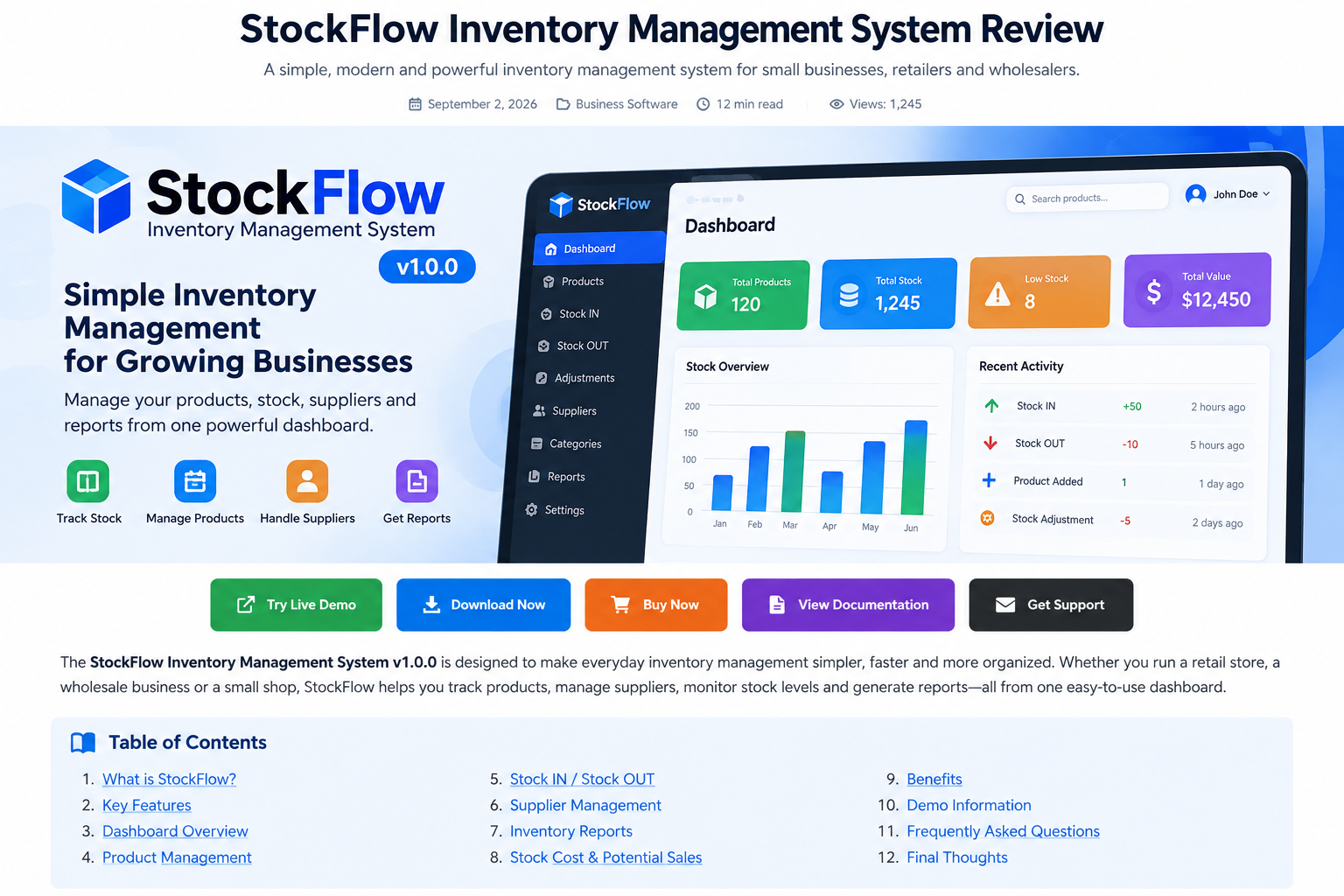
The StockFlow dashboard is designed to provide a quick overview of inventory activity. A good dashboard should answer important questions without requiring the user to open multiple pages.
For example, a business owner may want to know how many products are currently available, how many products are low in stock, how much stock has been added and how much inventory value is currently being held.
StockFlow brings important inventory information together so users can quickly identify areas that require attention.
 “`
“`
 “`
“`
Table of Contents
- What Is StockFlow?
- Why Inventory Management Matters
- StockFlow Dashboard
- Key StockFlow Features
- Who Can Use StockFlow?
- Stock IN vs Stock OUT
- How StockFlow Can Improve Daily Workflow
- Benefits of Using StockFlow
- StockFlow vs Manual Inventory Tracking
- Clean and Responsive Design
- Stock Cost and Potential Sales
- Why Low Stock Monitoring Is Important
- Using Categories to Organize Inventory
- Supplier Management
- Inventory Reports for Better Decisions
- Useful Internal Resources
- StockFlow Demo
- Is StockFlow Suitable for Your Business?
- Getting Started With StockFlow
- Frequently Asked Questions
- Final Thoughts
Key StockFlow Features
1. Inventory Dashboard
The inventory dashboard provides a central overview of the system. Instead of navigating through several different sections to understand your inventory, you can use the dashboard as your starting point.
A dashboard is especially useful for business owners who want to check the overall situation quickly at the beginning or end of the day. It can also help staff identify products that need attention.
2. Product Management
Product management is one of the core components of StockFlow. Users can organize product information in a structured way instead of maintaining separate lists.
Keeping product records organized makes it easier to search for items, monitor quantities and maintain a consistent inventory workflow.
For businesses with many products, having a dedicated product management area can save time compared with manually searching through spreadsheets or paper records.
3. Stock IN
Stock IN is used when products enter your inventory. This can happen when you purchase products from suppliers, receive a new shipment or otherwise increase the available quantity of an existing product.
Recording incoming stock helps maintain a clearer inventory history. Instead of simply changing a number manually, users can treat stock movement as a structured operation.
4. Stock OUT
Stock OUT records situations where inventory leaves the business. This can include sales, transfers or other legitimate stock reductions.
Tracking stock leaving the business is essential because inventory quantities need to reflect real-world movement. When Stock OUT operations are recorded consistently, it becomes easier to understand why a product quantity has changed.
5. Stock Adjustments
Real-world inventory does not always match system records perfectly. Products can be damaged, misplaced, counted incorrectly or affected by other operational issues.
Stock Adjustments provide a practical way to correct inventory quantities when necessary. This feature helps businesses maintain more accurate records without creating confusing manual changes.
6. Low Stock Alerts
Running out of an important product can result in missed sales opportunities. StockFlow includes low-stock monitoring to help users identify products that may require replenishment.
Instead of discovering a shortage only after a customer asks for a product, businesses can review low-stock items and make purchasing decisions earlier.
7. Supplier Management
Suppliers play an important role in inventory operations. Businesses need to know where products come from and maintain organized supplier information.
StockFlow includes supplier management so product purchasing information can be handled more systematically.
8. Product Categories
As a product catalog grows, categories become increasingly important. Categories allow users to organize products into logical groups.
For example, a retailer may have categories such as mobile accessories, electronics, chargers, cables, cases or other product groups. A well-organized category structure makes searching and reporting easier.
9. Product Search
Searching through a large product list manually can waste time. StockFlow provides product search functionality so users can locate inventory items more efficiently.
A fast search workflow is especially useful for stores with hundreds or thousands of products.
10. Inventory Reports
Reports help turn raw inventory information into useful business information. StockFlow includes inventory reporting capabilities so users can review the condition and movement of their stock.
Inventory reports can help business owners make better purchasing and operational decisions by providing a more organized view of available information.
11. Stock Cost & Potential Sales
Knowing how much inventory you currently hold can be useful for business planning. StockFlow provides information related to stock cost and potential sales value.
This can help users understand the approximate financial scale of their current inventory and evaluate how much sales value may be represented by available products.
12. Stock Health Overview
Not every inventory problem is immediately visible from the total number of products. Stock health gives businesses a broader perspective.
A healthy inventory should contain enough stock to support sales without unnecessarily tying up capital in excessive quantities. StockFlow helps users identify areas such as low-stock products and overall inventory conditions.
Who Can Use StockFlow?
StockFlow is designed with small and medium-sized inventory operations in mind. The system can be useful for several types of businesses.
Small Retail Stores
A small retail store may have a limited team and a large number of daily inventory activities. StockFlow can help the owner maintain product records and monitor stock without requiring a complex enterprise system.
Wholesale Businesses
Wholesalers often manage larger quantities and multiple products. Organized stock movement and supplier information can help make daily inventory operations easier to manage.
Electronics & Accessories Stores
Electronics businesses frequently carry many similar products and variations. Search, categories, stock tracking and low-stock monitoring can be particularly useful in this environment.
Small Warehouses
A warehouse needs reliable information about products entering and leaving inventory. StockFlow’s Stock IN and Stock OUT functionality can provide a structured approach to basic warehouse inventory management.
Online Sellers
Online sellers also need accurate inventory records. If an item is listed as available but has already sold out, the seller may face order cancellation or customer dissatisfaction. Maintaining an organized stock record can help reduce these problems.
See StockFlow in Action
Explore the public demo to understand the interface and experience the main workflow before making a purchase.
“` Open StockFlow Demo “`Stock IN vs Stock OUT
One of the most important concepts in inventory management is understanding the movement of stock. Stock IN increases inventory while Stock OUT decreases inventory.
| Operation | Effect | Example |
|---|---|---|
| Stock IN | Increases available stock | Receiving a supplier shipment |
| Stock OUT | Decreases available stock | Selling a product |
| Adjustment | Corrects inventory quantity | Physical stock count correction |
Keeping these operations separate makes inventory activity easier to understand. When a product quantity changes, the business can identify whether the change was caused by incoming stock, outgoing stock or an adjustment.
How StockFlow Can Improve Daily Workflow
A well-designed inventory system can reduce repetitive administrative work. Instead of maintaining product lists in one place, supplier information in another and stock records somewhere else, StockFlow provides a centralized workflow.
A typical daily process might begin by checking the dashboard. The user can then review low-stock products, search for specific items, record incoming stock, record outgoing stock and review reports when necessary.
This workflow helps create consistency. The system becomes a single source of inventory information for the business.
Benefits of Using StockFlow
Better Organization
Product information, categories, suppliers and stock movements can be organized inside one system.
Faster Product Lookup
Product search can reduce the time needed to locate specific inventory items.
Improved Stock Visibility
The dashboard and stock health information can help users understand their inventory condition more quickly.
Early Identification of Low Stock
Low-stock alerts can help businesses identify products that may need replenishment.
More Structured Stock Movement
Stock IN, Stock OUT and adjustments provide a clearer approach to inventory changes.
Useful Inventory Information
Reports, stock cost and potential sales information can support business planning and purchasing decisions.
StockFlow vs Manual Inventory Tracking
Many small businesses begin inventory management with notebooks or spreadsheets. This can work when the product catalog is very small, but problems can appear as the business grows.
| Area | Manual Method | StockFlow |
|---|---|---|
| Product Management | Manual lists | Centralized product management |
| Stock Movement | Manual entries | Stock IN / Stock OUT |
| Low Stock | Manual checking | Low-stock monitoring |
| Search | Slow for large lists | Product search |
| Reports | Manual calculations | Inventory reports |
| Inventory Overview | Multiple records | Central dashboard |
The objective is not simply to replace paper with software. The bigger advantage is having a consistent process for recording and reviewing inventory information.
Clean and Responsive Design
StockFlow is designed around simplicity. An inventory management system should not require users to spend hours learning complicated menus before they can perform basic tasks.
The responsive approach also makes the system more practical for different screen sizes. Businesses may use a desktop computer in the office, a laptop in the warehouse or another device depending on their workflow.
A clean interface reduces visual clutter and makes frequently used inventory functions easier to find.
Stock Cost and Potential Sales
Inventory is not only about quantities. It also represents money invested in products.
For example, imagine a retailer has 100 units of a product. Knowing the quantity is useful, but understanding the approximate cost of those units and their potential sales value can provide additional business insight.
StockFlow includes stock cost and potential sales information to help users get a broader understanding of the financial value represented by their inventory.
This information can be particularly useful when reviewing purchasing strategies. If too much capital is tied up in slow-moving products, the business may want to reconsider purchasing quantities or promotional strategies.
Why Low Stock Monitoring Is Important
Low-stock monitoring is one of the most practical inventory features for retailers. Popular products can sell quickly, and a business may not realize that stock is running low until customers begin asking for unavailable items.
A low-stock alert gives the business an opportunity to react earlier. The owner can review the product, check supplier availability and decide whether another purchase is necessary.
This does not mean every low-stock product must immediately be reordered. Instead, the information gives the business owner a better basis for making that decision.
Using Categories to Organize Inventory
Categories become more valuable as the number of products increases. A store with 20 products may be able to remember most items. A store with 500 or 5,000 products needs a structured system.
Categories allow related products to be grouped together. This can improve product discovery, reporting and general inventory organization.
For example, a business selling technology products could organize inventory into categories such as mobile accessories, charging products, audio products, cables, cases and other relevant groups.
Supplier Management
Inventory management does not stop at the store shelf. Businesses also need reliable supplier information because suppliers are responsible for replenishing inventory.
A supplier management module provides a central place for supplier-related information. When purchasing decisions need to be made, having organized supplier records can make the process more efficient.
Combined with Stock IN functionality, supplier management creates a more complete inventory workflow from receiving products to monitoring available stock.
Inventory Reports for Better Decisions
Reports are useful because they transform inventory records into information that can be reviewed.
A business owner may use inventory reports to identify products with low quantities, review stock levels, understand inventory value or investigate stock movement.
Reports can also support periodic inventory reviews. For example, a business could review inventory weekly or monthly to identify trends and determine whether purchasing practices need to change.
Ready to Explore StockFlow?
“`Start with the public demo and see whether StockFlow fits your inventory workflow.
Explore the Demo “`Useful Internal Resources
If you are exploring StockFlow on this website, you can also visit the following pages to learn more about the product and related resources.
- StockFlow Features — Explore the main features and inventory tools.
- StockFlow Documentation — Read the available documentation and usage information.
- StockFlow Pricing — View product and purchasing information.
- Installation Guide — Learn about installation and setup.
- Contact Us — Get in touch for questions or product support.
External Resources
If you are learning about web-based software and inventory technology, these external resources may also be useful:
What Is Included With StockFlow?
A StockFlow purchase includes the product files, documentation and usage instructions associated with the product. Buyers should review the included documentation carefully before installation or deployment.
The documentation is particularly important because it provides information about how the product is intended to be used. Before modifying, redistributing or deploying the system in a production environment, users should also review the applicable license terms.
StockFlow Demo
Before purchasing StockFlow, users can explore the public demo. The demo is designed for evaluation purposes and allows potential buyers to understand the main interface and workflow.
The demo can be useful for checking how the dashboard works, exploring product management, reviewing stock operations and understanding the general structure of the application.
Because the demo is provided for evaluation, demo data should not be treated as permanent business data.
Demo Data Reset Notice
The public StockFlow Demo uses temporary demo data. According to the product notice, the demo data automatically returns to the original sample data after local midnight.
This means users should not rely on the public demo for storing real business inventory information. The demo is primarily intended to let potential customers evaluate the system.
Is StockFlow Suitable for Your Business?
StockFlow may be a good fit if your business needs a simple inventory-focused system without unnecessary complexity.
It can be particularly useful if you currently depend on spreadsheets or handwritten stock records and want to move toward a more structured digital workflow.
It can also be useful if your existing process makes it difficult to identify low-stock products, find products quickly or understand the overall value and health of your inventory.
However, every business has different requirements. Before purchasing, review the available documentation, features and license terms to make sure the system matches your operational needs.
Getting Started With StockFlow
- Explore the public StockFlow Demo.
- Review the available features.
- Check the documentation and system requirements.
- Review the product license.
- Purchase the product if it meets your requirements.
- Install and configure the system according to the documentation.
- Add your product categories and product records.
- Add supplier information.
- Enter your current inventory quantities.
- Start recording Stock IN, Stock OUT and adjustments.
- Review low-stock alerts and inventory reports regularly.
Frequently Asked Questions
What is StockFlow?
StockFlow is a modern inventory management system designed to help small businesses, retailers and wholesalers manage products, stock movement, suppliers, categories, reports and inventory health from one system.
Who is StockFlow designed for?
StockFlow is designed primarily for small businesses, retailers, wholesalers, stores and other product-based businesses that need straightforward inventory management.
Does StockFlow include Stock IN and Stock OUT?
Yes. StockFlow includes dedicated Stock IN and Stock OUT functionality for recording inventory movement.
Does StockFlow have low-stock alerts?
Yes. Low-stock monitoring is included to help users identify products that may require replenishment.
Can I manage suppliers?
Yes. Supplier Management is one of the main features included in StockFlow.
Can I organize products into categories?
Yes. StockFlow includes Product Categories so businesses can organize their inventory into logical groups.
Does StockFlow have product search?
Yes. Product Search is included to make it easier to locate inventory items.
Does StockFlow include reports?
Yes. Inventory Reports are included as part of the system’s inventory management features.
Can I try StockFlow before purchasing?
Yes. A public StockFlow Demo is available for evaluation. Users can explore the main features before deciding whether the product is suitable for their needs.
Does the public demo store my real business data permanently?
No. The public demo is intended for evaluation and uses temporary demo data. The demo data automatically returns to the original sample data after local midnight.
Where can I find documentation?
You can use the StockFlow Documentation page on this website to access available documentation and usage information.
Can StockFlow be distributed or modified?
Users should review the included license before modifying, distributing or deploying the software. The license determines what is permitted.
Final Thoughts
Inventory management does not need to be unnecessarily complicated. For many small businesses, the most important requirement is having a clear and dependable way to know what products are available, what is running low, what has entered the inventory and what has left it.
StockFlow — Inventory Management System v1.0.0 focuses on these practical requirements. With an inventory dashboard, product management, Stock IN, Stock OUT, stock adjustments, low-stock alerts, supplier management, categories, product search and inventory reports, the system provides a centralized approach to everyday inventory operations.
The inclusion of stock cost, potential sales information and stock health overview also gives business owners a broader understanding of their inventory. Instead of looking only at product quantities, users can review the overall condition and potential value of their stock.
For a small retailer or wholesaler that wants to move away from scattered manual records, StockFlow can provide a more organized digital workflow. The responsive interface also makes the system suitable for modern business environments where users may work from different devices.
If you are considering StockFlow for your business, the best place to start is the public demo. Spend some time exploring the dashboard, product management, stock movement and reporting workflow. Then review the documentation and license before purchasing or deploying the software.
Ready to Manage Your Inventory Better?
“`Explore StockFlow and see how a simple inventory management workflow can help you organize products, monitor stock and understand your inventory more clearly.
Try StockFlow Demo View Pricing “`
Product: StockFlow — Inventory Management System v1.0.0
Purpose: Inventory management for small businesses, retailers and wholesalers.
Demo: Public evaluation demo with temporary demo data.