This post contains affiliate links. If you buy through them, we may earn a small commission at no extra cost to you.
🕑 14 min read
Introduction: The Growing Challenge of Business Asset Tracking
In the modern business landscape, keeping track of physical and digital assets can quickly become a chaotic task. Every growing company accumulates a wide variety of equipment over time. For example, businesses must manage laptops, office furniture, specialized machinery, company vehicles, and expensive electronics. Without a centralized tracking system, these physical items can easily go missing. Furthermore, failing to track who currently holds an item can lead to costly operational bottlenecks. Many businesses still rely on disorganized spreadsheets to solve this problem. However, manual spreadsheets often lead to human error, broken formulas, and outdated data.
Fortunately, modern software development offers smart solutions to these administrative headaches. Today, smart businesses are turning toward local, browser-based tools to handle complex internal workflows. If you have explored our ExpenseTrack Review: The Ultimate Browser tool, you already know how efficient browser-native applications can be. They eliminate the need for bloated software installations and high recurring monthly subscription fees. Instead of paying for a massive cloud suite, you can run your operations directly from your web browser. This brings us to a highly specialized tool designed specifically for tracking company equipment and hardware.
In this comprehensive review, we will explore AssetTrack in complete detail. We will examine how this system simplifies asset tracking for small and medium businesses. We will also analyze its core features, calculate depreciation models, and discuss its unique local-storage design. By the end of this guide, you will understand exactly how this lightweight tool can transform your daily business operations. Let us dive in and see if this software fits your organizational needs.
Try the Live AssetTrack Demo NowWhat is AssetTrack? An Innovative Browser-Based Solution
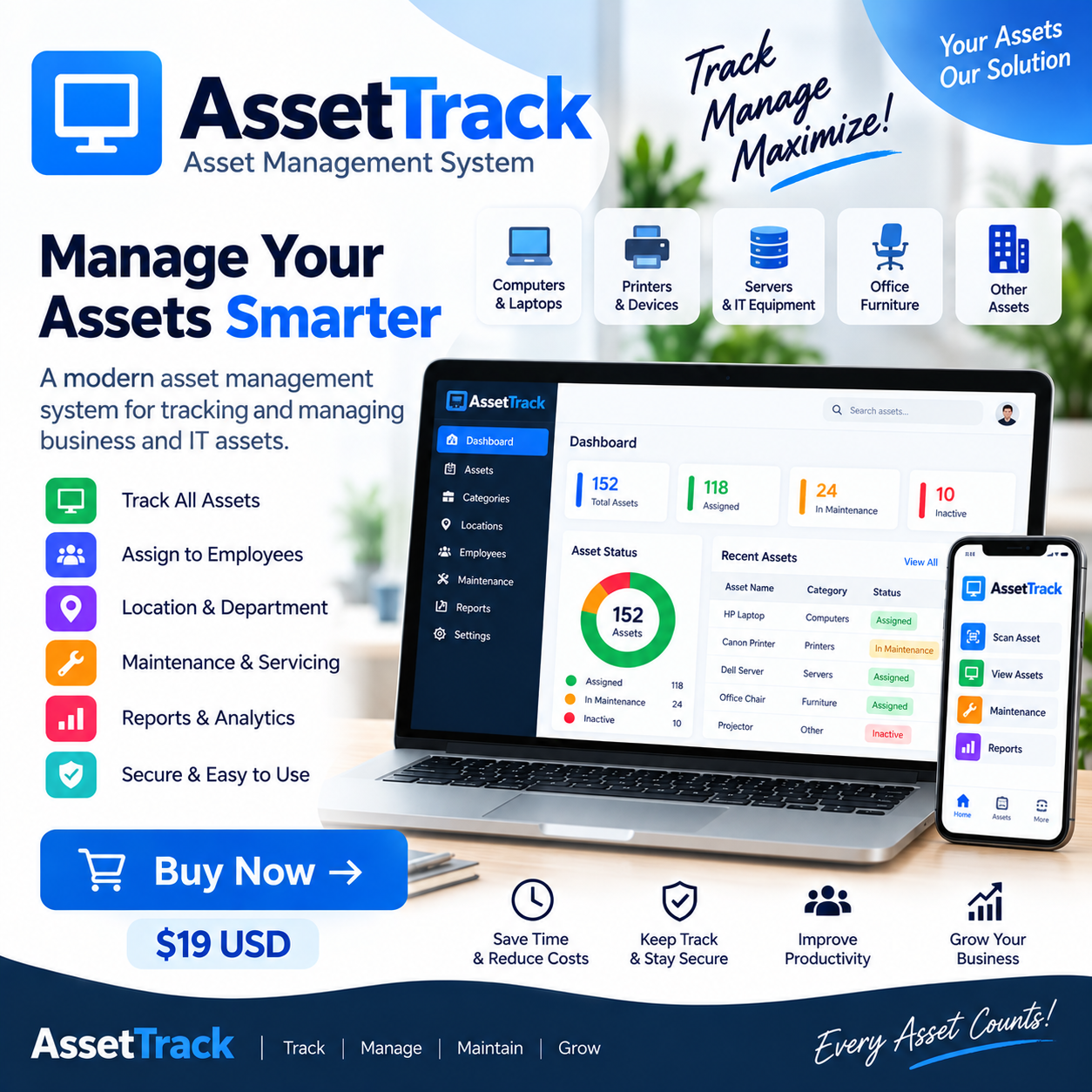
AssetTrack is a modern, responsive, and fully offline-friendly browser-based asset management system. This application runs directly inside any modern web browser without requiring a remote server, external database, or complicated setup. It provides businesses with a clean, centralized dashboard to track IT hardware, office furniture, vehicles, and custom asset categories. By using the browser’s built-in LocalStorage technology, AssetTrack saves all your data locally on your computer. Consequently, you do not have to worry about third-party data breaches, cloud downtime, or slow loading speeds.
Unlike traditional software as a service (SaaS) products, this tool does not require user authentication or server-side synchronization. It is a front-end web application built for speed, privacy, and simplicity. You simply open the HTML application in your browser and start cataloging your inventory. In addition, it features a fully responsive layout. As a result, you can manage your database seamlessly on desktop computers, tablets, and mobile devices. This makes it an ideal option for managers who need to audit equipment while walking through physical warehouses.
For businesses looking to integrate offline-first workflows, this tool mirrors the design philosophy of other high-performing offline packages. For example, you can see a similar serverless, browser-based structure in our review of StockFlow Inventory Management System v1.0.0. Both tools prioritize complete data ownership and immediate local execution. By keeping your operational data inside your local browser storage, you maintain total control over your sensitive business records. Let us look closer at the specific features that make this tool so powerful.
Detailed Features and Benefits of AssetTrack
Complete Support for All Asset Types
Every business owns a unique mix of physical items. For this reason, a rigid tracking system that only logs computer hardware is highly impractical. AssetTrack solves this problem by supporting all physical asset types under a single unified dashboard. You can effortlessly manage IT gear, office furniture, industrial machinery, delivery vehicles, and delicate consumer electronics. In addition, the system allows you to create custom asset categories to match your specific industry. This high level of flexibility ensures that you can adapt the software to your unique workflow.
Automatic Straight-Line Depreciation Engine
Calculating the changing value of your physical assets is crucial for accurate financial reporting and tax calculations. Fortunately, AssetTrack features an automated straight-line depreciation engine. You do not have to calculate depreciation curves manually on paper or in complex spreadsheets. Instead, the application uses a standard formula to calculate current values in real time. Specifically, the system determines annual depreciation using the purchase price, the salvage value, and the estimated useful life of the asset.
The system uses the following formula to compute your numbers:
- Annual Depreciation = (Purchase Price − Salvage Value) / Useful Life
- Current Value = Purchase Price − (Annual Depreciation × Years Since Purchase)
To protect your financial integrity, the software ensures that the calculated current value never drops below your pre-configured salvage value. Consequently, your financial reports always remain balanced, realistic, and highly accurate.
Unique Asset Tags and Identification
Managing a large physical inventory requires clear labeling and quick reference points. AssetTrack enables you to assign unique asset tags and identification numbers to every single item. When you label your physical equipment with matching physical tags, you establish a reliable audit trail. If an employee brings a laptop to the IT help desk, you can quickly locate the digital record using its tag. This fast identification reduces administrative search times and eliminates inventory confusion entirely.
Assignee and Location Tracking
Assets are constantly moving between different employees, physical offices, and regional departments. Therefore, you must know exactly who is holding an item and where it is located. AssetTrack lets you record and update the employees, teams, and physical spaces responsible for each piece of equipment. If a camera or vehicle goes missing, you can quickly find the responsible custodian in your system. This level of accountability encourages employees to handle company property with greater care.
Proactive Maintenance and Repair Records
Heavy machinery, fleet vehicles, and high-end electronics require regular servicing to stay operational. AssetTrack includes a built-in maintenance tracking tool to record repairs, tune-ups, and service histories. By keeping a detailed history of service records, you can monitor the long-term reliability of specific brands or models. In addition, tracking maintenance helps you catch recurring issues early. As a result, you can extend the overall lifespan of your machinery and avoid sudden, costly breakdowns.
Lifecycle Status Monitoring
Every business asset moves through a natural lifecycle from the day you purchase it to the day you retire it. With AssetTrack, you can monitor this progression through customizable lifecycle statuses. You can label items as active, in maintenance, in storage, or retired. This visual tracking ensures you do not waste money buying new gear when you have working items stored in a back closet. It also helps you identify which older items are ready for disposal or recycling.
Visual Reports Dashboard
Data is only useful if you can analyze it quickly to make smart business decisions. AssetTrack includes a clean reports dashboard that visualizes your entire inventory at a glance. The system generates helpful charts and summaries of total asset values, cumulative depreciation, and asset-age distributions. You can also view breakdowns of assets sorted by category, location, and operational status. These visual metrics provide valuable insights during annual budgeting, resource allocation, and tax planning sessions.
Day/Night Theme and Responsive Design
A software application must be comfortable to use for long periods. To address this, AssetTrack includes a modern, high-contrast day and night theme switcher. You can toggle between light and dark modes with a single click to reduce eye strain during late-night audits. Furthermore, the responsive layout ensures that the user interface scales perfectly. Whether you are using a large 4K desktop monitor or a small smartphone, the application remains highly legible and easy to navigate.
Offline-First Security and Local Storage
Unlike standard SaaS tools that require an active internet connection, AssetTrack runs entirely offline. The software stores your data securely inside your web browser using LocalStorage. This design choice means your business data never travels to external servers, protecting your company from web exploits and data harvesting. It also guarantees that you can manage your assets when traveling, working in remote field offices, or during internet service outages.
Explore the Interactive Features DemoWho is AssetTrack For?
AssetTrack is built specifically for users who value data privacy, simplicity, and speed over complex enterprise integrations. It is an ideal tool for small business owners who do not have a dedicated IT department. Typically, these owners need to track a few hundred physical items without dealing with server setups. Because it is incredibly easy to configure, you can start cataloging your inventory in under five minutes.
Furthermore, IT managers in medium-sized organizations find great value in this browser-based utility. It allows them to quickly track hardware deployments without relying on expensive, slow corporate ticketing systems. School administrators, non-profit organizers, and workshop managers can also use it to keep track of shared equipment, tools, and learning materials.
Finally, this offline-friendly system is perfect for remote teams and field operations. If your team operates in locations with unreliable internet access, cloud-based asset managers become useless. On the other hand, AssetTrack runs perfectly in any remote environment because it requires zero server contact. It keeps your field audits moving forward smoothly regardless of your current network status.
Pros and Cons of AssetTrack
The Pros (Advantages)
- No Server Setup: The application runs instantly in any modern web browser without server configuration.
- Maximum Data Privacy: All data stays stored inside your browser’s LocalStorage, keeping your information fully private.
- Instant Value Depreciation: The automatic straight-line depreciation engine saves hours of manual math.
- No Monthly Fees: You buy the script once on platforms like Gumroad and own the software forever without recurring subscription costs.
- Mobile Responsive: The interface works wonderfully on tablets, mobile phones, and desktop screens.
- Day and Night Modes: The built-in dark theme makes the interface easy on your eyes during long tracking sessions.
The Cons (Limitations)
- No Server-Side Sync: Because it is a front-end-only application, you cannot automatically sync data across multiple different computers.
- Browser Dependent: If you clear your browser’s history and cookie cache without backing up, you could lose your local data.
- No Built-In User Auth: The tool does not include user login screens, making it best suited for single-user management or localized machines.
How AssetTrack Compares to Alternatives
When searching for a tool to manage business assets, you generally face three choices. First, you can use massive cloud-based enterprise systems. Second, you can use basic spreadsheet templates. Third, you can choose a specialized, offline-first browser system like AssetTrack. Let us compare these options to understand where AssetTrack shines.
Enterprise cloud-based platforms offer cross-device syncing and deep user permission settings. However, these platforms charge high monthly subscription fees that add up quickly over time. They also require hours of training to learn and involve complex setup processes. For many small organizations, these systems are simply too complex and expensive. If you are already managing your client relationships using simplified tools, such as the ones discussed in our guide on CRM Software for Small Business, you know that keeping tools lightweight is often much better for productivity.
On the other hand, traditional spreadsheet software is free but highly prone to errors. If a user accidentally deletes a formula or overwrites an asset row, your entire financial depreciation history can break. Furthermore, spreadsheets lack structured fields for maintenance tracking, visual status dashboards, and easy image attachments.
AssetTrack sits in the perfect middle ground between these options. It offers the structure, automated math, and clean visual dashboard of high-end software. At the same time, it maintains the extreme simplicity and zero-cost upkeep of a basic spreadsheet. When combined with simple billing workflows like those mentioned in our guide on Invoice Software for Small Business, AssetTrack helps you build a highly efficient, low-cost operational setup.
| Feature Comparison | Traditional Spreadsheet | SaaS Cloud Platforms | AssetTrack System |
|---|---|---|---|
| Setup Difficulty | Low (Needs design) | High (Involves IT setup) | Instant (Browser-based) |
| Data Security & Privacy | Medium (Local or shared cloud) | Low (Stored on third-party host) | High (Local browser storage) |
| Depreciation Automation | Manual calculations required | Automatic | Automatic straight-line formula |
| Cost Structure | Free / Cheap | Expensive Monthly Fees | One-time purchase |
AssetTrack Setup and Purchasing Information
Getting started with AssetTrack is exceptionally straightforward. Because it does not use a server or database, there are no complicated installation scripts to configure. You do not need to deal with web hosts, domain mapping, or database tables. You simply download the application files to your device, open the primary HTML file in your web browser, and begin tracking immediately. It runs beautifully on all major browsers, including Google Chrome, Mozilla Firefox, Apple Safari, and Microsoft Edge.
Furthermore, developers will appreciate the clean, modular code base of this front-end app. Because the entire product is built on lightweight HTML, CSS, and JavaScript, you can easily host the code on platforms like GitHub Pages for private team access. If you have worked with other browser-based office products, such as our recommended tools in the Browser-Based Payroll Software: PayrollLite Full Review, you will feel right at home with AssetTrack’s clean architecture.
When you buy the full version, you receive an instant digital download. The full version removes the demo constraints and allows you to build a permanent database of your physical assets. Most importantly, the full version does not automatically reset or clear your local data, allowing you to use it safely for long-term records. The developers at UpComing Solution continue to maintain the codebase, ensuring it remains fully compatible with new browser updates. To test the software before you buy, you can load the live demo link and test the interface on your own devices.
Try the Fully Functional Demo TodayFrequently Asked Questions About AssetTrack
Where is my data stored when using AssetTrack?
Your asset data is stored entirely locally inside your browser using a technology called LocalStorage. This setup ensures that your business records never upload to third-party web servers, providing excellent privacy and security.
Does AssetTrack require a monthly subscription fee?
No. Unlike standard cloud-based SaaS products, AssetTrack is a digital download with a one-time purchase. Once you buy the software, you can run it indefinitely without any recurring costs.
Can I run this software on my smartphone or tablet?
Yes. AssetTrack is designed with a fully responsive layout. The user interface adjusts perfectly to fit any screen size, allowing you to perform physical audits using your mobile devices.
How does the automatic depreciation feature work?
The software uses the standard straight-line depreciation method. By entering the purchase price, salvage value, and useful life of an asset, the system automatically calculates the annual depreciation and current value in real time.
What happens if I clear my web browser cache?
Because the software relies on your browser's LocalStorage, clearing your cache could delete your data. To protect your records, the application includes a simple export feature so you can save regular backups to your computer.
Do I need an active internet connection to use AssetTrack?
No. AssetTrack runs entirely offline. Once you load the HTML file on your device, you can use every single feature without any active network connection.
Conclusion & Final Verdict
Ultimately, AssetTrack is an exceptionally well-designed utility that proves you do not need expensive, bloated cloud systems to run a successful business. By focusing on speed, local privacy, and responsive design, this tool makes asset tracking accessible to organizations of all sizes. The automated straight-line depreciation engine saves hours of manual accounting work, while the clean reports dashboard provides instant visual clarity. Whether you need to track a small set of office computers or a large collection of machinery, this browser-based tool delivers a reliable, hassle-free experience. Stop struggling with error-prone spreadsheets and take control of your business assets today.
Get Started with the AssetTrack System