This post contains affiliate links. If you buy through them, we may earn a small commission at no extra cost to you.
🕑 15 min read
Introduction to Modern Financial Management
Tracking your money is often a very difficult task. Every day, small business owners and freelancers face endless financial transactions. For example, you must record every client payment. In addition, you must track small utility costs, software subscriptions, and daily office supplies. Consequently, your financial records can quickly become disorganized. Many people try to use complex spreadsheets to solve this problem. However, spreadsheets often feel clunky and hard to use on mobile devices. On the other hand, complex accounting software often requires expensive monthly fees. Fortunately, there is a simple and modern alternative that changes how we handle budgeting.
Enter ExpenseTrack, a sleek and responsive digital solution. This tool helps you manage both business and personal expenses in one unified space. Specifically, it operates entirely inside your modern web browser. First, it eliminates the need for expensive servers. Second, it keeps your data private by saving everything locally on your device. As a result, you do not have to worry about data leaks or cloud security issues. Indeed, this software offers a refreshing take on daily financial tracking. It combines high speed with absolute simplicity, making it perfect for busy professionals.
In this comprehensive review, we will explore everything this application has to offer. We will dive deep into its core functions. In addition, we will look at who can benefit most from its offline-friendly design. We will also weigh its pros and cons to help you make an informed purchase. If you want to take control of your financial activity today, read on to see why this system is a game-changer.
Try the Live ExpenseTrack Demo NowWhat is ExpenseTrack?
In simple terms, ExpenseTrack is a browser-based expense management system. It was built by the team at UpComing Solution to provide an instant, lightweight alternative to heavy accounting platforms. However, unlike traditional web apps, it does not rely on a hosted backend or a remote cloud database. Instead, it runs directly in any modern web browser. It uses your browser’s local storage to save your entries securely. Therefore, your financial information never leaves your computer or phone. This structure makes the tool incredibly fast and private.
Furthermore, you do not need to install any heavy files on your operating system. To start tracking, you simply open the application in your browser. This design makes it a perfect companion for other lightweight tools. For instance, you might already use a browser-based payroll system to manage employee salaries. By combining these tools, you can create a highly efficient, serverless digital office. You can quickly record incoming cash and track where your money goes without dealing with complex setups.
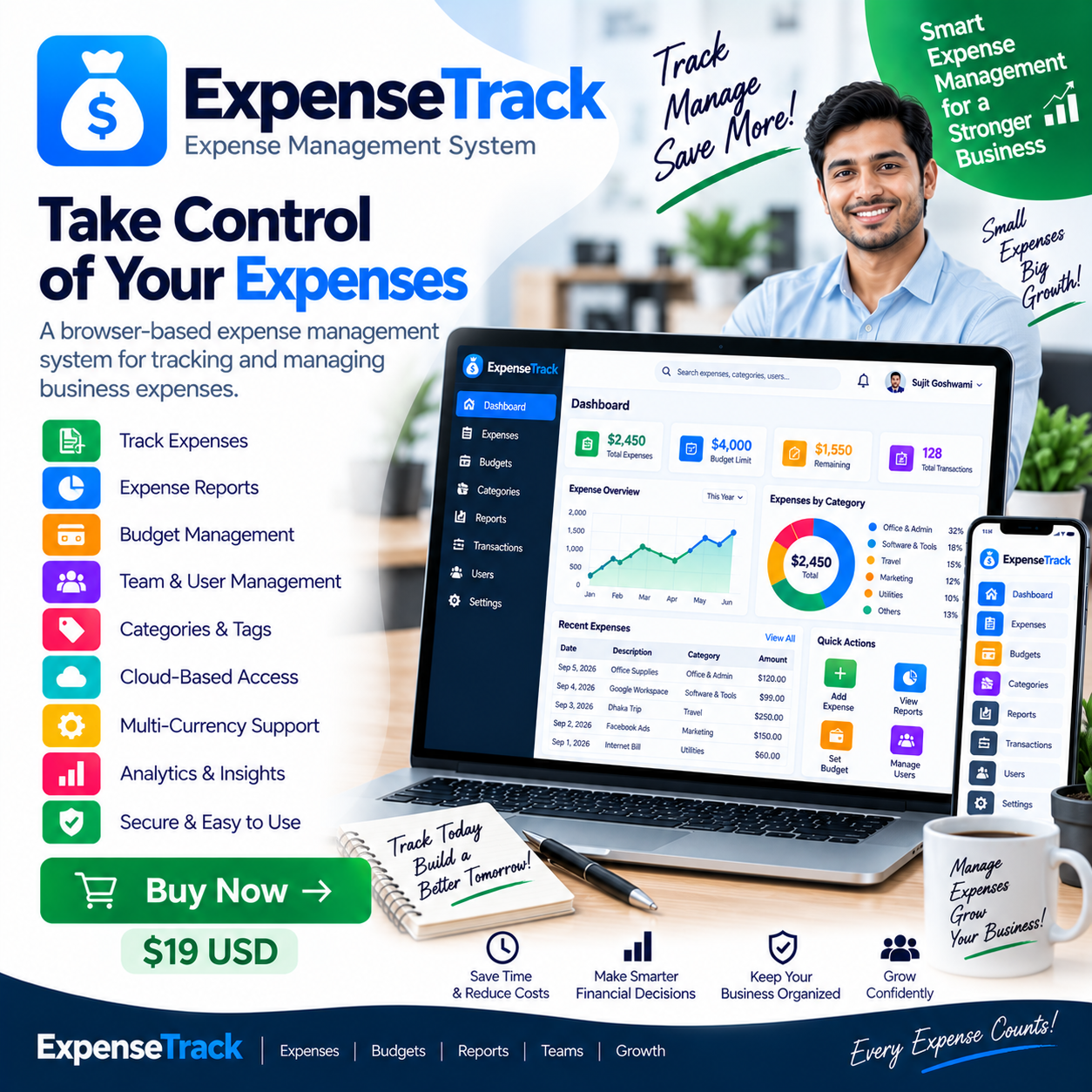
This software is delivered as a clean, complete front-end digital download. Once you purchase the v1.0.0 package, you receive all the files instantly. As a result, you can run it on your laptop, tablet, or desktop. Because it is highly optimized, it loads almost instantly. In contrast to online-only platforms, you can use it even when you do not have an internet connection. This offline usability ensures that you can record your expenses while traveling or working in remote areas.
Detailed Features and Benefits of ExpenseTrack
To understand the true value of this system, we must look at its core features. Each feature is designed to simplify your daily financial routine. Below, we break down the main capabilities of the system and explain how they benefit your workflow.
Comprehensive Expense Tracking
First and foremost, the system makes recording daily costs incredibly easy. Whenever you buy something, you can log it within seconds. For example, you can enter the amount, the date, and a quick description. In addition, you can assign the transaction to a specific category. Consequently, you will never find yourself wondering where your money went at the end of the month. By logging expenses immediately, you build a clear picture of your cash outflows. This practice helps you identify areas where you can easily save money.
Reliable Income Tracking
Tracking what you spend is only half of the battle. Therefore, this tool also includes a robust incoming money tracker. You can log client payments, salary deposits, or investments with equal ease. When you receive money, you simply enter the details in the system. As a result, you can easily compare your total earnings against your total outlays. This direct comparison is essential for maintaining a healthy cash flow. It ensures that your business remains profitable over the long term.
Customizable Categories
Organizing your data is crucial for accurate financial analysis. Luckily, ExpenseTrack includes a flexible categorization system. You can group your transactions into clear, distinct divisions. For instance, you can create categories for marketing, travel, rent, or grocery bills. This systematic division makes tax season far less stressful. Instead of sorting through a box of paper receipts, you can simply view your categorized digital logs. In short, it turns a chaotic mess of numbers into structured, useful information.
Detailed Payment Methods Tracking
In modern business, people use many different ways to pay. You might use a credit card for online software, cash for office coffee, and bank transfers for rent. Fortunately, this tool lets you track how each transaction was settled. You can label payments according to the specific card or bank account used. Consequently, reconciling your bank statements becomes a breeze. You can quickly check if your real-world bank balances match the records in your digital tracker.
Quick Financial Overview
Sometimes, you do not have time to look through hundreds of individual transactions. Instead, you need a high-level summary of your financial status. The tool addresses this need with a quick financial overview panel. This feature highlights your net savings and total cash flow at a glance. As a result, you can make fast, data-driven decisions. For example, if you see that your expenses are rising too fast, you can immediately cut back on unnecessary purchases.
Fast Search and Filtering
As time goes on, your financial log will grow very large. Searching for a transaction from six months ago could easily become a headache. However, this application features a fast, built-in search and filtering tool. You can find specific items in seconds by typing keywords or filtering by dates. If you need to find out exactly how much you paid for a specific service last summer, you can locate it instantly. This save-time feature keeps you highly organized and efficient.
Simple and Modern Dashboard
A complicated user interface can easily ruin a good software tool. Therefore, the creator designed this dashboard to be as clean and simple as possible. It displays your most important financial data in one centralized hub. You do not have to click through multiple confusing menus to find what you need. Everything is laid out logically, using clean fonts and modern visual elements. This simplicity reduces the learning curve, allowing anyone to start tracking without prior training.
Fully Responsive Design
Modern professionals do not work at a single desk all day. You might start your day on a laptop, check your tablet during lunch, and use your phone on the go. Because of this, ExpenseTrack features a fully responsive design. The user interface automatically adjusts to fit any screen size perfectly. Whether you are using a large desktop monitor or a compact smartphone, the buttons remain easy to click and the text stays highly readable. Thus, you get a premium user experience on every device.
Browser-Based and Offline-Friendly
Finally, the standout feature of this system is its serverless architecture. Because it runs directly in your browser, it requires no installation. Furthermore, it works wonderfully without any internet connection. The application saves all your entries using your browser’s internal database. In fact, this local storage method is highly secure because no third-party server can access your data. This offline capability ensures that your financial tool is always ready to work, even during internet outages.
Check Out the Features on the Live DemoWho is ExpenseTrack For?
This software is highly versatile, but it is especially useful for specific groups of people. First, it is an excellent tool for freelancers and independent contractors. When you work for yourself, keeping business and personal expenses separate is very important. This application allows you to track every client payment and project cost in one fast system. As a result, you can calculate your net profits without hiring an expensive accountant.
Second, small business owners will find great value in this lightweight tool. If you already run a point-of-sale management tool or utilize CRM software for small businesses, you know how crucial simplicity is. You do not want another complex platform that takes hours to set up. ExpenseTrack acts as a perfect, no-fuss companion. It allows you to monitor your daily cash flow without complicating your existing business operations.
Third, this tool is ideal for privacy-conscious individuals. Many people do not want to share their private financial habits with large tech corporations. When you use standard personal finance software, your data is often saved on external servers. In contrast, ExpenseTrack keeps your data entirely local. Because it stores everything in your browser’s local storage, you remain in complete control of your financial information. It is the ultimate choice for users who prioritize privacy and security.
Finally, budgeting beginners will love this system. If you have never tracked your money before, other accounting tools can feel overwhelming. They are often full of confusing tax terms and complex double-entry ledger systems. On the other hand, this application focuses strictly on the basics. It gives you a clean slate to build healthy financial habits. You can easily master the basics of budgeting within just a few minutes of opening the app.
Pros and Cons of Using ExpenseTrack
No software review is complete without an honest look at both sides. Every tool has its strengths and limitations. Below, we outline the pros and cons of this system to give you a balanced perspective.
The Advantages (Pros)
- Absolute Privacy: Your financial data is stored locally in your browser. As a result, no external servers can access or leak your private records.
- Zero Subscription Fees: You purchase the full version once. Consequently, you never have to worry about recurring monthly charges or hidden fees.
- High Speed: Because there is no slow database server to contact, the app loads instantly. Transactions are saved and filtered in milliseconds.
- Works Offline: You do not need a stable internet connection. This makes it ideal for frequent travelers or remote workers.
- No Installation Required: Simply open the HTML files in any modern web browser to begin using the tool immediately.
- Responsive Layout: The interface looks great and works smoothly on smartphones, tablets, and desktop computers alike.
The Disadvantages (Cons)
- No Cloud Synchronization: Because it is serverless, your data does not automatically sync across different devices. For instance, data entered on your phone will not appear on your desktop unless you manually move it.
- Browser Dependency: The application relies on your browser’s storage system. If you clear your browser’s cache or local storage completely, you might lose your saved data. Therefore, you must be careful when running cleaning tools.
- No Hosted Backend: It does not support multi-user accounts, automated bank feeds, or server-side backups. It is designed to be a simple front-end application.
How ExpenseTrack Compares to Traditional Alternatives
When looking for a budgeting tool, you have many options. It is helpful to see how this browser-based system stands against traditional alternatives. First, let us compare it to standard spreadsheets like Microsoft Excel or Google Sheets. Spreadsheets are highly customizable, but they are often difficult to use on small screens. For example, entering a transaction on a mobile sheet can be very frustrating. In addition, one wrong formula can break your entire spreadsheet. In contrast, ExpenseTrack offers a pre-built, beautifully optimized mobile interface. It handles all the math for you, ensuring a seamless experience.
Second, we can compare it to high-end SaaS accounting systems. These cloud-based systems are powerful, but they come with heavy monthly subscription costs. Over a year, these fees can add up to hundreds of dollars. Furthermore, they are often packed with advanced features that small businesses do not actually need. For instance, if you just need to track basic daily outlays, you do not need complex multi-currency tax calculators. ExpenseTrack strips away this unnecessary complexity. It focuses strictly on what matters most, saving you both money and cognitive energy.
Third, let us look at the setup process. Many advanced accounting systems require you to configure databases, install local runtime environments, or complete tedious sign-up forms. If you use a modern invoicing system, you know how nice it is when things just work out of the box. ExpenseTrack brings this same convenience to budgeting. There are no databases to set up and no accounts to verify. It represents the pinnacle of friction-free financial software.
To help visualize these differences, here is a quick comparison table:
| Feature | ExpenseTrack | Spreadsheets | Cloud SaaS Apps |
|---|---|---|---|
| Cost Model | One-time purchase | Free / Subscription | Monthly subscription |
| Data Privacy | High (Stored locally) | Medium (Cloud-dependent) | Low (Stored on third-party servers) |
| Mobile Usability | Excellent (Responsive UI) | Poor (Small cells) | Excellent (Native App) |
| Offline Support | Full (No internet needed) | Partial | None / Very Limited |
Pricing and Purchasing Guidance
When buying software, understanding the pricing structure is very important. Many modern platforms hide their real costs behind tiers, add-ons, and upgrade fees. However, this application is sold as a straightforward digital product. When you buy it from the official merchant page on Gumroad, you get lifetime access to the software files. There are absolutely no recurring bills or maintenance fees. This transparent approach makes it an incredibly affordable asset for any budget.
Because there are no ongoing costs, your investment pays for itself very quickly. Specifically, you save money by avoiding monthly software bills. In addition, the time you save by using an organized tracker helps you focus on profitable business tasks. If you want to make sure the app is right for you before spending any money, you are in luck. The creator provides a completely free live web demo. This demo allows you to click through the interface, add dummy transactions, and test the features in real-time. By trying the demo first, you can buy with total confidence.
When you complete your purchase, you receive an instant digital download. The package contains all the necessary HTML, CSS, and JavaScript files. You do not need any special keys to unlock the code. This means you can keep a copy of the software on your backup drives forever. Even if the creator stops supporting the app years from now, your copy will continue to run perfectly in any standard web browser.
Visit the Official Gumroad StoreFrequently Asked Questions
Is my financial data safe with ExpenseTrack?
Yes, your data is highly secure. Because this is a browser-based front-end application, it does not send your data to any external cloud database. All information is saved locally inside your browser's local storage. This means your private financial habits remain completely on your personal device.
Do I need to pay a monthly subscription fee?
No. This product is sold as a digital download with a one-time purchase model. Once you buy it, you own the code and can use it forever without any recurring monthly or annual fees.
Does ExpenseTrack work when I am offline?
Absolutely. Since all files run directly in your web browser and save data locally, you do not need an active internet connection to manage your expenses. This makes it incredibly convenient for travelers and remote professionals.
How do I backup my data if it is stored in the browser?
Since the app uses browser-based storage, clearing your browser cache can delete your records. It is highly recommended to regularly export your data or avoid using extreme cleaner tools that wipe your browser's database.
Can I run this app on my iPhone or Android device?
Yes. The application features a highly responsive web design. You can easily open the application files in any mobile browser on iOS or Android, and the user interface will adapt perfectly to your screen size.
Does this system include a cloud-hosted backend?
No. This is a front-end application built with HTML, CSS, and JavaScript. It does not include a hosted database, server-side code, or user authentication systems. It is meant to be a simple, lightweight personal or micro-business tracker.
Closing Verdict: Is ExpenseTrack Worth It?
If you are looking for a fast, private, and highly cost-effective way to manage your cash flow, ExpenseTrack is an exceptional choice. It avoids the bloat and high costs of modern SaaS products, delivering a pure budgeting utility that works entirely in your browser. For small business owners, it pairs beautifully with other offline tools like the StockFlow inventory system. By keeping your data local, you protect your privacy while maintaining lightning-fast performance. In addition, the responsive design ensures you can track on the go. Stop stressing over messy notebooks and complex spreadsheets. Give this elegant browser-based tool a try and enjoy simple, hassle-free budgeting today.
Get Instant Access to ExpenseTrack Now